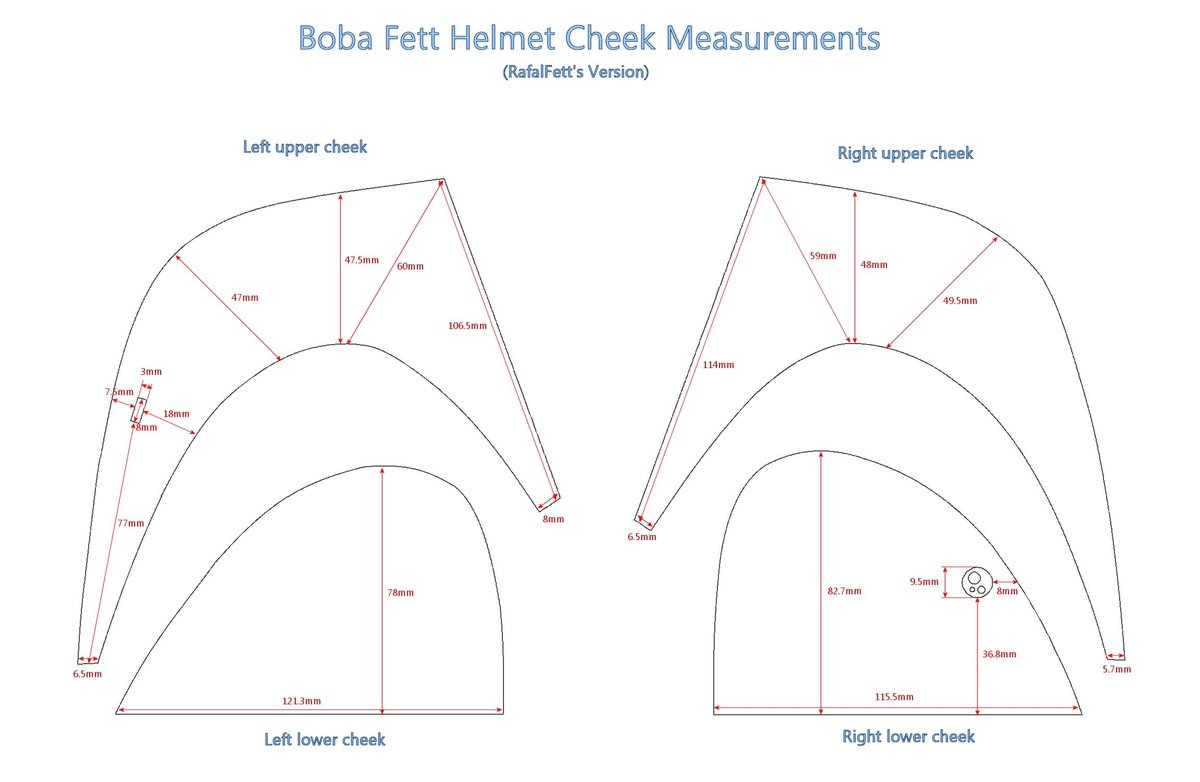
Building a Boba Fett helmet is more than just a DIY project; it's a rite of passage for any true Star Wars enthusiast, a tangible piece of the galaxy far, far away you craft with your own hands. Thanks to incredible advancements in 3D printing, creating a screen-accurate, wear-ready Boba Fett helmet from scratch is now within reach for hobbyists and makers worldwide. This isn't just about assembling parts; it's about meticulous design selection, precision printing, and the artistry of post-processing and painting that truly brings this iconic Mandalorian armor to life.
Whether you're aiming for a pristine Empire Strikes Back look, a weathered Return of the Jedi aesthetic, or the updated feel from The Mandalorian, the journey of DIY Boba Fett Helmet Building & 3D Printing is deeply rewarding. It blends technical skill with creative expression, challenging you to learn new techniques and pay homage to one of pop culture's most enduring figures.
At a Glance: Your Helmet Building Journey
- Start with a Great 3D Model: The foundation of your helmet is a high-quality, printable 3D file. Accuracy and printability are key.
- Gear Up Your Workshop: An FDM 3D printer, suitable filament, and essential hand tools are your core arsenal.
- Master the Print Settings: Dialing in layer height, infill, and supports ensures successful, strong prints.
- Transform Raw Plastic: Post-processing—sanding, filling, and priming—is crucial for a smooth, paint-ready surface.
- Bring on the Paint: Reference materials, careful masking, and layered painting create the iconic look.
- Weather the Storm: Authentic weathering details truly make your helmet look like it's seen battle across the galaxy.
- Final Assembly: Install the visor, rangefinder, and interior padding for comfort and wearability.
- Patience is Your Ally: This is a multi-stage project. Embrace the process and enjoy each step.
Why Forge Your Own Beskar (or PLA)?
The allure of building your own Boba Fett helmet goes beyond simply owning a cool prop. It's about personal investment, a deep dive into the details, and the satisfaction of craftsmanship. While you could buy a replica, crafting one yourself offers unparalleled benefits:
- Unmatched Customization: Want a specific weathering pattern or a unique internal setup? Building allows you complete control over every minute detail, letting you perfectly match a specific cinematic appearance or even develop your own "what if" scenario.
- Learning & Skill Development: From understanding 3D printer mechanics and troubleshooting to mastering advanced painting and weathering techniques, you'll pick up a host of valuable skills applicable to many other projects.
- Cost-Effectiveness: Often, building a high-quality 3D printed helmet can be significantly cheaper than purchasing a professional-grade replica, especially if you already own a 3D printer.
- Community Connection: The prop-building community is vibrant and supportive. Sharing your progress and seeking advice from fellow makers enriches the experience.
- The Bragging Rights: There’s a distinct pride in saying, "I made this," especially when it’s an item as iconic as Boba Fett's helmet.
The Digital Foundation: Finding Your Perfect Boba Fett Helmet 3D Model
Before a single layer of filament is laid down, you need a digital blueprint. The quality of your 3D model directly dictates the accuracy and success of your final helmet. Think of this as selecting your beskar ingot – it needs to be pure.
Where to Hunt for STL Files
Several online marketplaces and repositories host a treasure trove of 3D models. When searching for "Boba Fett helmet STL," you'll typically find:
- Free Repositories: Sites like Thingiverse and Printables.com offer a vast collection of free models, often uploaded by passionate hobbyists. Quality can vary wildly, so read comments and check maker photos.
- Paid Marketplaces: Platforms such as MyMiniFactory, Cults3D, and Etsy (often through independent artists selling models) feature professionally sculpted and optimized models. These typically come with a cost but often guarantee higher accuracy, better detail, and support from the designer. Many artists meticulously research screen-used props to ensure fidelity.
What to Look For in a Model
Not all Boba Fett helmet models are created equal. Here’s what separates the great from the garbage:
- Screen Accuracy: Does it faithfully replicate the lines, proportions, and unique features of the helmet you're aiming for (e.g., ESB, ROTJ, The Mandalorian)? Compare it against reference photos.
- Printability:
- Sectioned Design: Most wearable helmets are too large to print in one go on a standard desktop FDM printer. Look for models that are intelligently cut into multiple interlocking pieces. This makes printing easier, reduces support material, and allows for better finish quality on individual components.
- Wall Thickness: Ensure the model has sufficient wall thickness for structural integrity (typically 2-3mm). Thin walls can lead to brittle prints.
- Minimal Overhangs: While supports are part of 3D printing, a well-designed model minimizes complex overhangs where possible.
- Detail Resolution: Does the model capture the subtle nuances, dents, and surface textures you expect? High-resolution meshes translate to finer details in your print.
- Designer Support/Community Feedback: For paid models, check if the designer offers support. For free ones, user comments often highlight printability issues or successful configurations.
Pro Tip: Don't just download and print the first model you find. Spend time researching, comparing different versions, and reading reviews. A good model saves you countless hours of post-processing down the line.
Assembling Your Armory: The 3D Printing Workshop
With your digital blueprint secured, it’s time to prepare your physical workshop. While you don't need a professional studio, a few key pieces of equipment and supplies are essential.
Your 3D Printer: The Beskar Forger
For helmet building, an FDM (Fused Deposition Modeling) printer is the most common and cost-effective choice.
- Build Volume: Crucially, your printer needs a large enough build volume to accommodate the individual helmet sections. A minimum of 220x220x250mm is generally recommended, but larger is always better to reduce the number of individual pieces you need to print and glue together. If you're choosing your first 3D printer, consider a model known for reliability and a decent print area.
- Reliability: Consistency is king. You’ll be running long prints, sometimes for days. A printer known for its stability and minimal failures will save you immense frustration.
Filament: The Raw Material
The plastic you use is more important than you might think.
- PLA (Polylactic Acid): This is the most common and easiest filament to print. It’s affordable, produces good detail, and is relatively rigid. However, PLA can warp and soften under high heat (like a hot car), so it’s not ideal for outdoor wear in direct sunlight without proper finishing.
- PETG (Polyethylene Terephthalate Glycol): A good all-rounder, PETG is stronger and more temperature-resistant than PLA, while still being relatively easy to print. It’s a popular choice for props that might see more rigorous use.
- ABS (Acrylonitrile Butadiene Styrene): Known for its strength and heat resistance, ABS is excellent for durable props. However, it’s trickier to print (requires an enclosed printer to prevent warping) and emits fumes that necessitate good ventilation. It can also be smoothed with acetone vapor, offering a unique finishing advantage.
- Specialty Filaments: Some makers experiment with carbon fiber reinforced PLA or PETG for added strength, though these can be abrasive to printer nozzles.
Recommendation: For a first helmet, PLA is a great starting point due to its ease of use. Once you gain experience, consider PETG for added durability.
Essential Tools for the Bounty Hunter's Bench
Beyond the printer and filament, a well-stocked workbench is crucial. Think of these as your essential tools for 3D printing:
- For Printing:
- Slicer Software: Cura, PrusaSlicer, or Simplify3D are industry standards for translating your 3D model into printer instructions (G-code).
- Print Bed Adhesive: Gluestick, hairspray, or PEI sheets to ensure your prints stick.
- Nozzle Wrench & Cleaning Needles: For maintenance.
- Flush Cutters: To remove supports and trim small bits of plastic.
- For Assembly & Finishing:
- Cyanoacrylate (CA) Glue (Super Glue): For initial bonding of parts.
- Epoxy or Plastic Welder: For stronger, permanent bonds between helmet sections.
- Putty/Filler: Bondo spot putty, wood filler, or 3D print specific fillers to fill seams and layer lines.
- Sandpaper: A wide range of grits, from 80 to 2000, for smoothing.
- Rotary Tool (Dremel-style): With various bits for sanding, grinding, and detail work.
- Respirator Mask & Safety Glasses: Absolutely critical for sanding, filling, and painting to protect your lungs and eyes.
- Primer: Sandable automotive primer is highly recommended.
- Painting Supplies: Spray paint, airbrush setup, various brushes, masking tape.
- Measuring Tools: Calipers, ruler.
- Hobby Knife/X-Acto: For precision cutting and trimming.
Printing the Mythosaur Skull: Slicing and Execution
Now for the main event: bringing your helmet into the physical realm. This stage requires careful attention to your slicer settings and a good understanding of your printer.
Slicer Settings: The Digital Maestro
Your slicer software is where you prepare your 3D model for printing. This involves several critical settings:
- Layer Height: This determines the resolution of your print.
- 0.2mm: A good balance for speed and detail, often sufficient for helmet parts that will be heavily post-processed.
- 0.12mm - 0.16mm: For finer detail, especially on smaller, intricate pieces.
- Trade-off: Finer layers mean longer print times.
- Infill: The internal structure of your print.
- 10-20%: Generally sufficient for helmet pieces. It provides structural integrity without adding excessive weight or print time. Use a cubic or gyroid pattern for good strength.
- Walls/Perimeters: How many layers thick the outer shell of your print will be.
- 3-4 Walls: Recommended for strength. This ensures a robust shell that can withstand sanding and handling.
- Supports: Essential for printing overhangs.
- Tree Supports: Often preferred in Cura and PrusaSlicer as they are easier to remove and leave fewer marks than traditional line supports.
- Support Angle: Start with 45-50 degrees.
- Support Density/Interface: Adjust for easier removal.
- Print Speed: While tempting to print fast, slower speeds (e.g., 40-60 mm/s for outer walls) yield better print quality and reduce the risk of failures.
- Bed Adhesion: Use a brim or skirt to ensure the first layer sticks well, especially for large parts.
The Printing Process: Patience and Vigilance
Printing a full helmet can take dozens, sometimes hundreds, of hours across multiple parts.
- Preparation: Clean your print bed thoroughly. Apply adhesive if necessary. Ensure your filament is dry (moisture can cause quality issues).
- Calibration: Perform a test print (like a calibration cube or a small part of the helmet) to ensure your printer is well-calibrated, especially the first layer adhesion.
- Start Printing: Monitor the first few layers closely. A good first layer is paramount for print success.
- Troubleshooting: Be prepared for potential issues:
- Warping: Corners lifting off the bed. Solution: better bed adhesion, enclosed printer (for ABS), or brim.
- Layer Shifting: Layers misalign during print. Solution: check belt tension, motor stability.
- Stringing: Fine plastic hairs between parts. Solution: calibrate retraction settings, lower hotend temperature.
- Clogged Nozzle: Filament stops extruding. Solution: clean or replace nozzle.
Expert Insight: Many seasoned prop makers print helmet pieces with a slightly higher infill on critical stress points (like where the cheek meets the dome) or add additional reinforcing features in the slicer if the model allows.
From Raw Plastic to Beskar Steel: Post-Processing & Finishing
This is where the magic happens, transforming a rough 3D print into a smooth, professional-looking prop. This stage is often the most time-consuming but yields the most significant visual improvements.
Removing Supports and Initial Cleanup
Once your prints are complete:
- Support Removal: Use flush cutters, pliers, and a hobby knife to carefully remove all support material. Be gentle to avoid damaging the print surface.
- Rough Sanding: Use 80-120 grit sandpaper or a rotary tool with a sanding drum to aggressively remove any large nubs, blobs, or stubborn support remnants. Focus on getting the major shape right.
Assembling the Pieces
If your helmet is in multiple parts (which it almost certainly will be):
- Test Fit: Dry-fit all the pieces together. Sand down any areas that don't align perfectly.
- Initial Bonding: Use CA glue to tack the pieces together.
- Reinforcement: Once tacked, apply epoxy or a plastic welder along the inside seams for a strong, permanent bond. This step is crucial for durability. Allow ample cure time.
Filling and Smoothing: The Pursuit of Perfection
This is the labor-intensive part of sanding and finishing 3D prints. The goal is to eliminate all visible layer lines and seams.
- Seam Filling: Apply a generous amount of Bondo spot putty, wood filler, or a similar plastic filler to all seams and significant gaps. Allow it to fully cure.
- Heavy Sanding (180-220 Grit): Once dry, sand down the filler using progressively finer grits. Focus on making the filled areas flush with the rest of the helmet. Use a sanding block on flat surfaces for evenness.
- First Primer Coat: Apply a thin, even coat of sandable automotive primer. This reveals all imperfections you missed, like hidden layer lines, pinholes, and subtle bumps.
- Spot Filling & Sanding (320-400 Grit): Circle any newly visible imperfections with a marker. Fill them with more putty (or even a thinner filler like glazing putty) and sand them smooth. Repeat priming and sanding as necessary.
- Fine Sanding (600-800 Grit): Once you're happy with the overall smoothness, do a final round of fine sanding.
- Second Primer Coat: Apply another coat of primer, ensuring it’s perfectly smooth and even. This is your canvas.
Alternative Smoothing Techniques:
- XTC-3D: A two-part epoxy coating specifically designed to smooth 3D prints. It's brushed on, self-levels, and cures to a hard, smooth finish. It's faster than sanding but can obscure fine details if applied too thickly.
- Vapor Smoothing (for ABS): If you printed with ABS, you can use acetone vapor to chemically melt and smooth the outer layer, completely eliminating layer lines. This is a more advanced technique and requires proper safety precautions (ventilation, sealed chamber).
The Mandalorian's Palette: Painting Your Helmet
Painting is where your Boba Fett helmet truly comes alive, transforming inert plastic into a worn piece of legendary armor. Accuracy here is paramount.
Reference is King
Before touching a brush, gather extensive reference images. The Boba Fett helmet has subtle variations across its appearances (ESB, ROTJ, The Mandalorian), and even within the same film, lighting and wear differ.
- Color Swatches: Research specific paint colors. Many prop builders share their exact paint mixes or brand recommendations online.
- Detail Shots: Pay close attention to the placement of dents, scratches, and weathering.
Paint Types and Application
- Spray Cans: Excellent for base coats and large, even areas. Look for automotive-grade spray paints for durability and a smooth finish.
- Airbrush: Indispensable for fine details, gradients, soft weathering, and consistent coverage of smaller areas. It allows for much greater control than spray cans.
- Acrylics & Enamels: Used for hand-painted details, washes, and small touch-ups.
The Painting Process: Layers of Legacy
- Base Coats: Start with the primary colors, working from darkest to lightest or vice-versa depending on your chosen painting style. Apply multiple thin coats rather than one thick one to prevent drips and maintain detail.
- Masking: This is critical for crisp lines and precise color separation. Use high-quality painter's tape (like Tamiya tape) and a sharp hobby knife for clean edges. Apply the tape firmly to prevent bleed, but don't press so hard it removes previous paint layers when peeled.
- Detail Painting: Use an airbrush or fine brushes for the intricate patterns, stripes, and the iconic "kill stripes." Advanced painting techniques for cosplay props often involve layering and subtle blending.
- Weathering Prep: Some weathering is integrated into the painting process. For example, painting a silver base coat, then masking areas where battle damage would expose the metal, then painting the main color. Later, you chip away the top color to reveal the "metal" beneath.
Battle Scars & Beskar Shine: Weathering for Authenticity
A brand-new Boba Fett helmet doesn't look right. It needs the history of a thousand bounties, the grit of Tatooine, and the scorch marks of blaster fire. Weathering is the art of making your prop look aged and used.
Techniques to Master
- Chipping & Scratching: Use fine brushes, sponges, or even the tip of a toothpick to carefully apply silver paint to edges and areas where paint would naturally chip away, revealing the metal underneath. You can also use the "salt technique": apply salt grains to a base coat, spray a top coat, then wipe away the salt to reveal chips.
- Washes: Thinned dark paints (black, brown, sepia) or specialized weathering washes can be applied into recesses and panel lines to enhance depth and simulate dirt and grime. Wipe away excess with a damp cloth or cotton swab.
- Dry Brushing: Dip a brush in a small amount of paint (usually lighter colors for highlights or metallic for edges), wipe most of it off, then lightly drag the brush over raised details to catch edges and bring out texture.
- Soot & Dirt Effects: Use pigments, pastels, or thinned dark paints to simulate blaster marks, exhaust stains, or general grime accumulation. An airbrush is excellent for soft, diffused effects.
- Oil & Grease Stains: Use gloss clear coats mixed with dark pigments to create realistic oil streaks around moving parts or battle damage.
- Mastering weathering effects truly elevates a prop from a toy to a piece of art.
Clear Coats and Protection
Once all your paint and weathering is complete, protect your hard work with a clear coat.
- Matte or Satin: Boba Fett's helmet typically has a satin or matte finish, not glossy. Choose a clear coat that matches this aesthetic.
- Durability: A good clear coat protects against scratches, UV damage, and general wear. Apply several thin, even coats, allowing each to dry fully.
The Final Touches: Visor, Rangefinder, and Internal Comfort
Your helmet is painted and weathered; now it's time to make it wearable and functional.
The Visor: Your Window to the Galaxy
The visor is a critical component for both aesthetics and wearability.
- Material: Dark acrylic or polycarbonate sheet is ideal. Many prop builders use tinted welding visors (Shade 3 or 5) which are durable, easy to cut, and offer excellent visibility while maintaining the iconic dark look.
- Cutting & Shaping: Carefully cut the visor to shape using a rotary tool, Dremel, or sharp hobby knife. Test fit frequently.
- Installation: Secure the visor from the inside using hot glue, epoxy, or small screws, ensuring no light leaks around the edges.
The Rangefinder: Iconic Accessory
Many Boba Fett helmet models include a functional (or at least articulated) rangefinder.
- Assembly: If your model has a multi-part rangefinder, carefully assemble and paint it separately before attaching.
- Movement: Some designs incorporate small hinges or magnets to allow the rangefinder to pivot up and down. This adds a fantastic functional element.
- LED: For extra flair, tiny LEDs can be added to the rangefinder's "stalk" or "eye" to simulate its targeting display.
Internal Padding & Comfort
You've got a masterpiece, now make it comfortable to wear.
- Foam Padding: Use upholstery foam, EVA foam, or even helmet liner kits (like those for motorcycle helmets) to create a snug, comfortable fit.
- Placement: Focus padding on the top of the head, forehead, and sides to prevent the helmet from wobbling and distribute weight evenly.
- Ventilation: Consider adding small vents or fans if you plan on wearing the helmet for extended periods, especially in warmer climates, to prevent fogging and heat buildup.
Common Questions from the Bounty Hunter's Guild
Building a Boba Fett helmet invites many questions. Here are some of the most frequent:
"How long does it typically take to build a 3D printed Boba Fett helmet?"
This varies wildly based on your experience, the complexity of the model, and how much time you can dedicate. Expect anywhere from 80 to 200+ hours of actual work. Printing can take 40-100 hours alone. Post-processing (sanding, filling, priming) often takes the longest, easily another 40-80 hours. Painting and weathering can be another 20-50 hours. It's a marathon, not a sprint.
"How much does it cost to 3D print and finish a helmet?"
Assuming you already own a 3D printer:
- STL Model: Free to $50 (for a premium, accurate model).
- Filament: 1-2 kg, roughly $20-$50 per kg depending on type. Total $20-$100.
- Post-processing Supplies: Sandpaper, fillers, glues, primer: $50-$100.
- Paint & Weathering Supplies: Spray paints, airbrush paints, brushes, masking tape, clear coat: $100-$300 (can be more if you invest in an airbrush setup).
- Visor & Internal Padding: $20-$50.
Total: Roughly $200 - $600+ beyond the printer itself. This is significantly less than a high-end commercial replica.
"Is a 3D printed helmet durable enough for cosplay or conventions?"
Yes, absolutely! With proper infill settings, strong adhesives (epoxy), and a good clear coat, a 3D printed helmet can be very durable. PLA is a bit more brittle and heat-sensitive, but PETG and ABS offer excellent strength. The key is to handle it with care, as with any custom prop. The robust post-processing also adds a layer of rigidity.
"What if my 3D prints fail halfway through a large piece?"
Print failures are part of the journey. Don't get discouraged!
- Troubleshoot: Analyze why it failed (bed adhesion, clog, layer shift, power outage).
- Restart: Sometimes, the only option is to restart the print.
- Salvage: For some failures, you might be able to salvage the partial print, sand down the break, and glue the missing piece on if you can reprint just that section. This might require more post-processing to hide the seam.
- Learn: Each failure is a learning opportunity to refine your settings or maintain your printer.
Beyond the Helmet: Your Next Galactic Project
Congratulations, bounty hunter! You’ve not only built an iconic piece of Star Wars lore but also sharpened a formidable set of maker skills. The journey of building your own Boba Fett helmet, from a digital file to a finished, battle-worn prop, is a testament to patience, precision, and passion. You’ve transformed raw plastic into a legend.
This experience opens up a universe of possibilities for your next project. Perhaps you'll tackle a full suit of Mandalorian armor, a lightsaber hilt, or another cherished prop from your favorite fandom. The techniques you’ve mastered—3D printing, complex post-processing, intricate painting, and realistic weathering—are transferable to countless other endeavors.
Keep honing your skills, experiment with new materials, and always seek out opportunities to learn from the thriving prop-making community. Remember, the true value isn't just in the finished object, but in the journey of creation and the satisfaction of bringing a piece of fantasy into reality. For a deeper dive into all things related to the most infamous bounty hunter's headgear, explore our comprehensive Boba Fett Helmet Guide. May your projects be successful, and your details always sharp!